.png)
.png)
.png)
.png)
For contractor teams
Find the unresolved record and affected work. Prepare evidence for review, with field, quality, and turnover teams using the same current status.
Evidence-to-release architecture
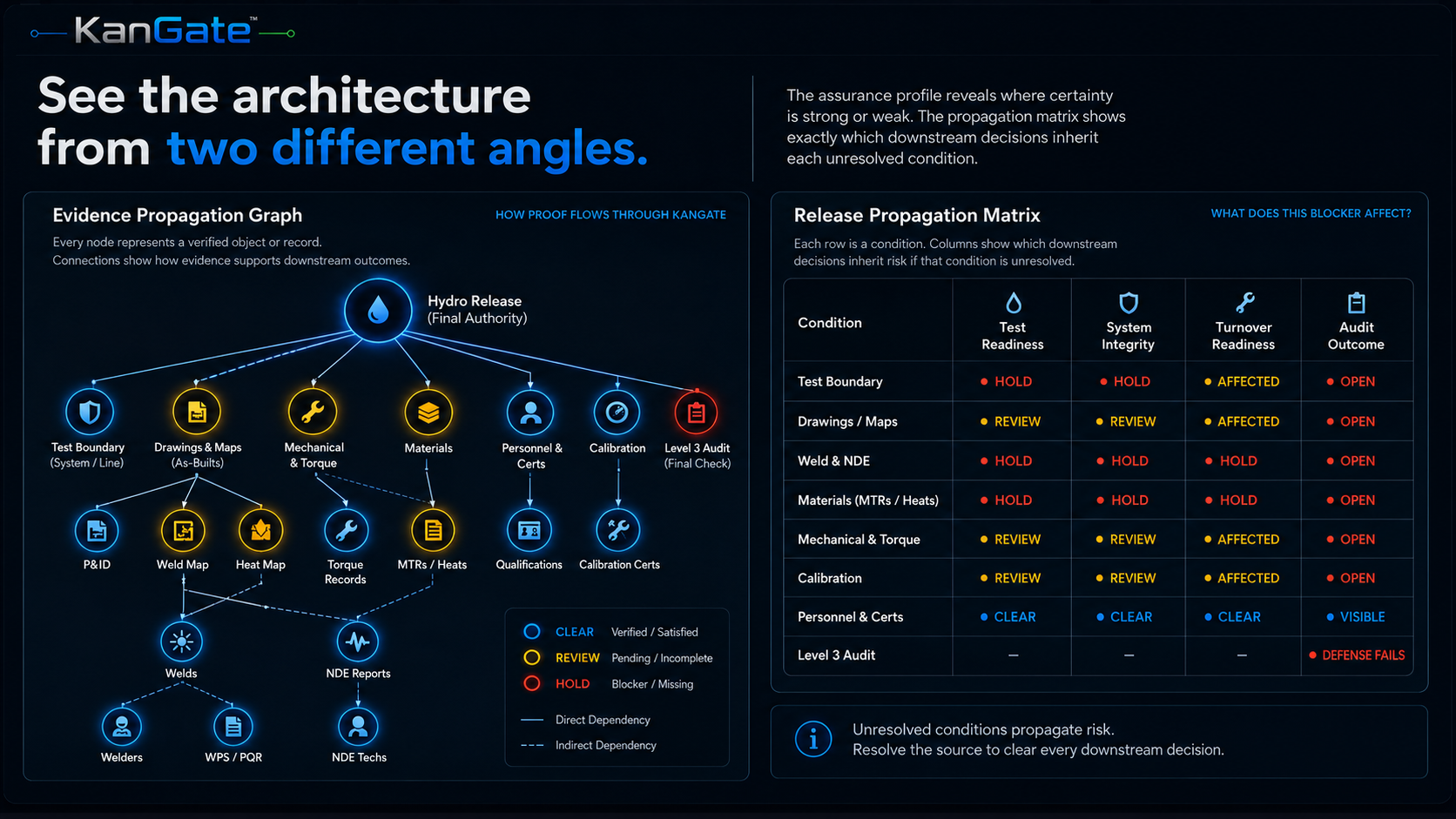
Connect drawings, inspection reports, material records, and qualifications to the work they support. See what meets the project’s requirements, what remains unresolved, and the evidence behind each decision.
For contractor teams managing the work and enterprise clients accountable for its delivery.
The operating sequence
Select a stage to follow W-14 through the platform. Each step connects a source record to a specific piece of work, checks the applicable requirements, and makes the result available for review.
Stage 01
An examination report arrives for W-14. Available evidence is recorded; missing information stays visible. Receipt alone does not establish compliance.
The defining bridge
The drawing calls it W-14. The examination report uses A-FAB-0021. The repair has another reference. KanGate checks which records describe the same weld and preserves each original reference, so the team can follow the work without losing its history.
A missing reference stays unresolved until the supporting evidence establishes the connection.
Connected project evidence
In this representative example, an accepted material certificate supports a heat number, its installed components, and their test package. The material blocker can close while unrelated conditions remain visible.
Deterministic validation
Check accepted evidence against applicable codes, project requirements, procedures, qualifications, calibration dates, and release criteria.
See how requirement changes propagateContinuously verified state
Representative sequence. Formal release remains with the designated authority.
Controlled outputs
Build the review package from the evidence connected to the work. See the current registers, supporting records, open conditions, and approval history together. Contractors can prepare the handover; enterprise reviewers can examine its basis.
Explore living turnover outputsArchitecture in operation
Explore welding records, package readiness, and generated outputs. Each view leads to the fuller product walkthrough.
Deployment options
Use KanGate on its own or alongside the systems holding your project records. Define the workflow, data exchange, and review responsibilities during scoping.
Find the unresolved record and affected work. Prepare evidence for review, with field, quality, and turnover teams using the same current status.
Inspect the basis for readiness, open conditions, and package decisions. Apply a consistent review approach across the projects in scope.
Autodesk AECO Technology Partner Program member
Explore a pilot